Code upgrade snippets from AX2009 to AX2012 and D365FO

InventDimSearch

In Microsoft Dynamics AX 2009, the InventDimSearch class was used to get information about the
inventory dimension setup. This class has been deleted and several new classes have been
implemented to make it possible to get information about the dimension setup.

In order to determine whether a dimension for a specific field is active in Microsoft Dynamics AX 2009,
the following code could be used:

InventDimSearch inventDimSearch = new InventDimSearch();
InventDimGroupId dimGroupId = InventTable::find(ItemId). DimGroupId;
;
if (inventDimSearch.findActive(dimGroupId,fieldNum(InventDim,wmsPalletId)))
{
    info(strFmt("The palletId dimension is active for dimension group %1",dimGroupId));
}

In Microsoft Dynamics AX 2012 & D365FO, this can be achieved by the following code:

InventTable inventTable;
InventDimGroupSetup inventDimGroupSetup;
InventDimGroupFieldSetup inventDimGroupFieldSetup;
 
inventDimGroupSetup = InventDimGroupSetup::newInventTable(inventTable);
inventDimGroupFieldSetup =
inventDimGroupSetup.getFieldSetup(fieldNum(InventDim,WMSPalletId));
 
if (inventDimGroupFieldSetup.isActive())
{
    info(strFmt("The palletId dimension is active for dimension group
    %1",inventDimGroupSetup.getStorageDimensionGroup()));));
}

EmplTable

In Microsoft Dynamics AX 2009

In Microsoft Dynamics AX 2012 & D365FO , we have HcmWorkerHelper class which gives much information about worker such as department, primary position, current legal entity and so on.

HcmWorkerRecId   hcmWorkerRecId =  HcmWorker::userId2Worker(curUserId());
HcmPositionRecId hcmPositionRecId = HcmWorkerHelper::getPrimaryPosition(hcmWorkerRecId);
 
HcmWorker currentWorker = HcmWorker::find(HcmWorkerLookup::currentWorker());
OMOperatingUnit department = HcmWorkerHelper::getPrimaryDepartment(currentWorker.RecId);
 
HcmWorker currentWorker = HcmWorker::find(HcmWorkerLookup::currentWorker());
CompanyInfo legalEntity = HcmWorkerHelper::getLegalEntity(currentWorker.RecId);
 
HcmWorker hcmWorker;
DirPersonUser dirPersonUser;
DirPerson dirPerson;
DirPartyTable dirPartyTable;
 
select * from hcmWorker
    where hcmWorker.RecId == hcmWorker::userId2Worker(curUserId());
 
select * from dirPerson
    where dirPerson.RecId == hcmWorker.Person;
 
select * from dirPartyTable
    where dirPartyTable.RecId == dirPerson.RecId;
 
 
info(strFmt("Current User Id: %1", curUserId()));
info(strFmt("Personnel Number: %1", hcmWorker.PersonnelNumber));
info(strFmt("Name: %1", DirPartyTable.Name));
 
static LogisticsElectronicAddress ElectronicAddress(DirPartyRecId _partyRecId,
    LogisticsElectronicAddressMethodType _type = LogisticsElectronicAddressMethodType::Phone)
{
 
    DirPartyLocation            dirPartyLocation;
    LogisticsElectronicAddress  electronicAddress;
    CompanyInfo                 companyInfo;
    DirPerson                   dirPerson;
    hcmWorker                   hcmWorker;
 
    companyInfo = companyInfo::find();
 
    select firstonly hcmWorker
        where hcmWorker.RecId == _partyRecId
    join dirPerson
        where dirPerson.RecId == hcmWorker.Person
    join dirPartyLocation
        where dirPartyLocation.Party == dirPerson.RecId
        &&  dirPartyLocation.IsPostalAddress == NoYes::No
    join electronicAddress
        where electronicAddress.Location == dirPartyLocation.Location
        && electronicAddress.Type == _type;
 
    return electronicAddress;
}

Unit converter

In Microsoft Dynamics AX 2009

UnitConvert::qty(Qty,FromUnitId,ToUnitId,ItemId);
Unit::decimals()

In Microsoft Dynamics AX 2012 & D365FO

UnitOfMeasureConverter::convert(_salesQty,  
               UnitOfMeasure::unitOfMeasureIdBySymbol(_inventUnit),  
               UnitOfMeasure::unitOfMeasureIdBySymbol(_salesUnit),  
               NoYes::Yes,  
               InventTable::itemProduct(_itemId),  
               NoYes::Yes);  
UnitOfMeasure::unitOfMeasureDecimalPrecision(UnitOfMeasure::unitOfMeasureIdBySymbol(unitID));

CompanyInfo

In Microsoft Dynamics AX 2009

CompanyInfo::standardCurrency()
CompanyInfo::find().CurrencyCode

In Microsoft Dynamics AX 2012 & D365FO

Ledger::accountingCurrency(CompanyInfo::current())

Currency

In Microsoft Dynamics AX 2009

Currency::amountCur2MST(*)
Currency::Amount()
Currency::exchRate(*)
Currency::exchRateSecond(*)

In Microsoft Dynamics AX 2012 & D365FO

CurrencyExchangeHelper::amountCur2MST(*)
CurrencyExchangeHelper::amount(*);
ExchangeRateHelper::exchRate(*)
ExchangeRateHelper::exchRateSecond()
| Tagged 

DynamicsAX与第三方系统(Using-webservice-to-connect-with-Dynamics-AX)

Webservice

第三方接口调用AX内部程序

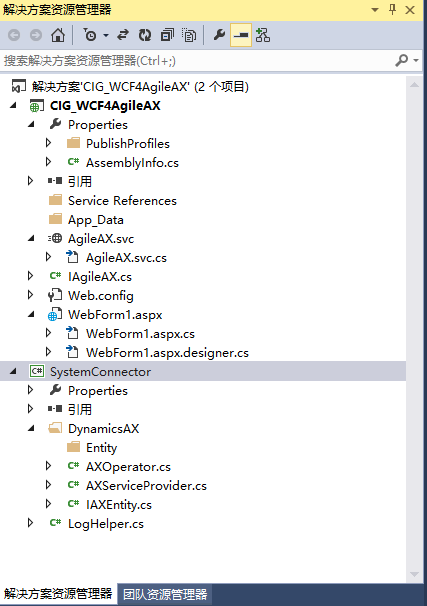
SystemConnector

在”Csharp”代码中,我们可以直接调用”Systemconnector”提供的接口从而实现执行AX内部程序的功能。

如:axServiceProvider.handleAgileData("cig", _XMLStr);

实际上 “axServiceProvider” 是通过内置函数 “CallStaticClassMethod” 来实现调用AX内部程序。

string returnStr = (string)op.CallStaticClassMethod("AX Class", "Class Method", _legal, _XMLStr);

将第三方外部程序组织的XML数据主动传递给AX,AX内部只需要解析该XML数据即可执行相应的业务逻辑操作。

在 axServiceProvider 中我们可以设定AX2009的环境端口,用户,密码,公司等信息,同样可以构建更多的方法来调用Ax不同的功能。

下文是通过”Csharp”代码调用接口的样例:

Consume SystemConnector in VS

1

using System;
using System.Collections.Generic;
using System.IO;
using System.Linq;
using System.Web;
using System.Web.UI;
using System.Web.UI.WebControls;
using System.Xml;
using SystemConnector.DynamicsAX;
 
namespace CIG_WCF4AgileAX
{
    public partial class WebForm1 : System.Web.UI.Page
    {
        protected void Page_Load(object sender, EventArgs e)
        {
            string ret = "";
            //string _XMLStr = GetXmlDocument(@"D:/AgileXml/HDC000076-utf.xml");
            //string _XMLStr = GetXmlDocument(@"E:/AgileXml/test1014/UPD-1014-33-01.xml");
            string _XMLStr = GetXmlDocument(@"E:/AgileXml/test1014/CIG000780.xml");
            //string _XMLStr = "AX-MES-RDIF-Go";
            try
            {
                AXServiceProvider axServiceProvider = new AXServiceProvider();
                //ret = axServiceProvider.handleRFIDData("cig", _XMLStr);
                ret = axServiceProvider.handleAgileData("cig", _XMLStr);              
            }
            catch (Exception ex)
            {
                ret= ex.ToString();
            }
            Response.Write(ret);
        }
 
        private static string GetXmlDocument(string xmlPath)
        {
            try
            {
                XmlDocument doc = null;
                if (File.Exists(xmlPath))
                {
                    doc = new XmlDocument();
                    doc.Load(xmlPath);               
                }
                return doc.InnerXml;
            }
            catch (Exception ex)
            {
                System.Diagnostics.Debug.Write(ex.Message);
            }
            return null;
        }
    }
}

AX内部程序调用第三方接口

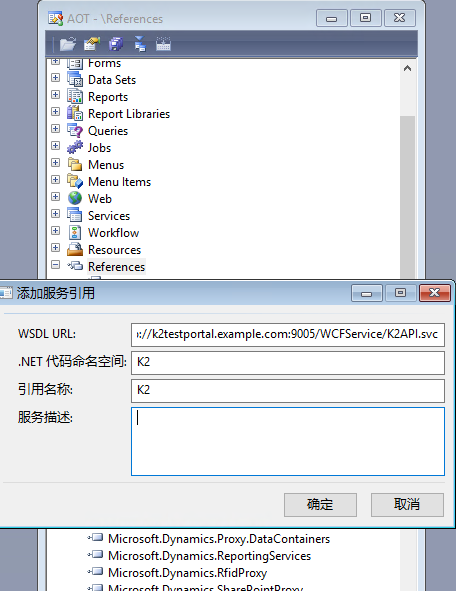
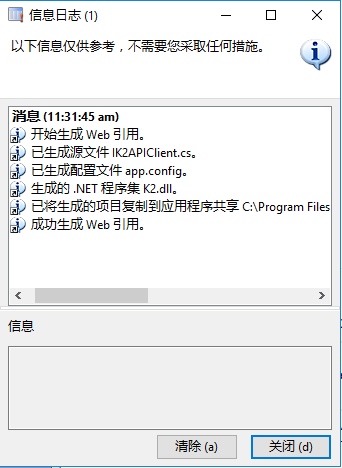
AX2009 调用外部接口只需要打开AOT-Reference-添加一个服务引用即可,添加引用时可以添加dll文件。

如下图:

2
3

这样就可以了。

如何在 DynamicsAX 中处理CLR对象报错的问题(Working-with-CLR-exceptions-in-Dynamics AX)

CLR对象报错

在 Dynamics AX 中 无论版本是2009还是2012或者D365,总是会遇到下面这两个报错:

  • Object ‘CLRObject’ could not be created
  • ClrObject static method invocation error

而且系统给出的日志实在是太简短了,让人摸不着头脑。不过一般出现这两个问题都是在AX中处理 .net 相关的 dll 或者在调用 web service、WCF。那么剩下的问题就是我们该怎么样得知在调用 .net 框架的时候究竟出了什么问题呢,一旦知道了具体原因就好办了。


好,那我们通过一个 Job 演示一下吧:

static void RaiseCLRException(Args _args)
{
    ;
    //Necessary if executed on the AOS
    new InteropPermission(InteropKind::ClrInterop).assert(); 
 
    try
    {
        //This will cause an exception
        System.Int32::Parse("abc");
    }
    catch(Exception::CLRError)
    {
        //Access the last CLR Exception
        info(CLRInterop::getLastException().ToString());
 
        //See AifUtil::getClrErrorMessage for another alternative
        //how to parse the Exception object 
 
    }
    //Revert CAS back to normal
    CodeAccessPermission::revertAssert();
}

执行上面代码我们可以得到如下信息:

System.Reflection.TargetInvocationException: Exception has been thrown by the target of an invocation. —> **System.FormatException: Input string was not in a correct format.**
  at System.Number.StringToNumber(String str, NumberStyles options, NumberBuffer& number, NumberFormatInfo info, Boolean parseDecimal)
  at System.Number.ParseInt32(String s, NumberStyles style, NumberFormatInfo info)
  at System.Int32.Parse(String s)
  — End of inner exception stack trace —
  at System.RuntimeMethodHandle._InvokeMethodFast(Object target, Object[] arguments, SignatureStruct& sig, MethodAttributes methodAttributes, RuntimeTypeHandle typeOwner)
  at System.RuntimeMethodHandle.InvokeMethodFast(Object target, Object[] arguments, Signature sig, MethodAttributes methodAttributes, RuntimeTypeHandle typeOwner)
  at System.Reflection.RuntimeMethodInfo.Invoke(Object obj, BindingFlags invokeAttr, Binder binder, Object[] parameters, CultureInfo culture, Boolean skipVisibilityChecks)
  at System.Reflection.RuntimeMethodInfo.Invoke(Object obj, BindingFlags invokeAttr, Binder binder, Object[] parameters, CultureInfo culture)
  at ClrBridgeImpl.InvokeClrStaticMethod(ClrBridgeImpl* , Char* pszClassName, Char* pszMethodName, Char* assemblyName, Int32 argsLength, ObjectWrapper** arguments, Boolean* argsAreByRef, Boolean* isException)

=> The part System.FormatException: Input string was not in a correct format.

从这一段就可以看出到底是哪里出问题了。

如何把Dynamics 365 FO UAT的数据库还原到开发环境(how-to-restore-d365fo-sandbox-db-to-dev)

还原数据库

以下是将 Sandbox DB 恢复到 DEV 的过程。

  1. LCS -> UAT -> Maintain -> Move Database -> Export database
  2. bacpac文件会被导出到资产库
  3. 从资产库下载bacpac文件
  4. 下载SqlPackage:sqlpackage-win-x64-zh-Hans-170.0.94.3
  5. 在cmd中运行下列命令
SqlPackage.exe /a:import /sf:D:\Exportedbacpac\my.bacpac /tsn:localhost /tdn:<target database name> /p:CommandTimeout=1200
Example
Demo
1.	SqlPackage.exe /a:import /sf:J:\MSSQL_BACKUP\Demo_PreProdbackup.bacpac /tsn:localhost /tdn:PreProd_20220712 /p:CommandTimeout=1200
Demo
2.	SqlPackage.exe /a:import /sf:J:\MSSQL_BACKUP\Demo_uatbackup.bacpac /tsn:localhost /tdn:uat_20221028 /p:CommandTimeout=1200
 
NEW-20251113
>SqlPackage.exe /Action:Import /SourceFile:"C:\Users\localadmin\Downloads\restoredb\cig-uatbackup.bacpac" /TargetServerName:"dvhd10039vm2" /TargetDatabaseName:"AxDB_Prod_20251107" /TargetEncryptConnection:False /p:CommandTimeout=0 /TargetTrustServerCertificate:True
  1. 等待
  2. 数据库还原成功后运行以下脚本并且更新数据库的名字
ALTER DATABASE [uatbackup_20190401.bacpac] SET CHANGE_TRACKING = ON (CHANGE_RETENTION = 6 DAYS, AUTO_CLEANUP = ON)
 
--
CREATE USER axdeployuser FROM LOGIN axdeployuser
EXEC sp_addrolemember 'db_owner', 'axdeployuser'
 
CREATE USER axdbadmin FROM LOGIN axdbadmin
EXEC sp_addrolemember 'db_owner', 'axdbadmin'
 
CREATE USER axmrruntimeuser FROM LOGIN axmrruntimeuser
EXEC sp_addrolemember 'db_datareader', 'axmrruntimeuser'
EXEC sp_addrolemember 'db_datawriter', 'axmrruntimeuser'
 
CREATE USER axretaildatasyncuser FROM LOGIN axretaildatasyncuser
EXEC sp_addrolemember 'DataSyncUsersRole', 'axretaildatasyncuser'
 
CREATE USER axretailruntimeuser FROM LOGIN axretailruntimeuser
EXEC sp_addrolemember 'UsersRole', 'axretailruntimeuser'
EXEC sp_addrolemember 'ReportUsersRole', 'axretailruntimeuser'
 
CREATE USER axdeployextuser FROM LOGIN axdeployextuser
EXEC sp_addrolemember 'DeployExtensibilityRole', 'axdeployextuser'
 
CREATE USER [NT AUTHORITY\NETWORK SERVICE] FROM LOGIN [NT AUTHORITY\NETWORK SERVICE]
EXEC sp_addrolemember 'db_owner', 'NT AUTHORITY\NETWORK SERVICE'
 
 
UPDATE T1
SET T1.storageproviderid = 0
, T1.accessinformation =''
, T1.modifiedby = 'Admin'
, T1.modifieddatetime = getdate()
FROM docuvalue T1
WHERE T1.storageproviderid = 1 --Azure storage
 
ALTER DATABASE [uatbackup_20190401.bacpac] SET CHANGE_TRACKING = ON (CHANGE_RETENTION = 6 DAYS, AUTO_CLEANUP = ON)
GO
DROP PROCEDURE IF EXISTS SP_ConfigureTablesForChangeTracking
DROP PROCEDURE IF EXISTS SP_ConfigureTablesForChangeTracking_V2
GO
 
-- Begin Refresh Retail FullText Catalogs
DECLARE @RFTXNAME NVARCHAR(MAX);
DECLARE @RFTXSQL NVARCHAR(MAX);
DECLARE retail_ftx CURSOR FOR
SELECT OBJECT_SCHEMA_NAME(object_id) + '.' + OBJECT_NAME(object_id) fullname FROM SYS.FULLTEXT_INDEXES
WHERE FULLTEXT_CATALOG_ID = (SELECT TOP 1 FULLTEXT_CATALOG_ID FROM SYS.FULLTEXT_CATALOGS WHERE NAME = 'COMMERCEFULLTEXTCATALOG');
OPEN retail_ftx;
FETCH NEXT FROM retail_ftx INTO @RFTXNAME;
 
BEGIN TRY
WHILE @@FETCH_STATUS = 0
BEGIN
PRINT 'Refreshing Full Text Index ' + @RFTXNAME;
EXEC SP_FULLTEXT_TABLE @RFTXNAME, 'activate';
SET @RFTXSQL = 'ALTER FULLTEXT INDEX ON ' + @RFTXNAME + ' START FULL POPULATION';
EXEC SP_EXECUTESQL @RFTXSQL;
FETCH NEXT FROM retail_ftx INTO @RFTXNAME;
END
END TRY
BEGIN CATCH
PRINT error_message()
END CATCH
 
CLOSE retail_ftx;
DEALLOCATE retail_ftx;
-- End Refresh Retail FullText Catalogs
==
  1. 停止所有D365FO的服务
  2. 重命名AXDB -> AXDB_OldYYYYMMDD
  3. 重命名还原好的数据库 -> AXDB
  4. 打开VS做数据库同步
  5. 启动所有D365FO的服务

如何在D365FO创建SSRS报表(三)Contract Class(how-to-create-ssrs-report-in-d365fo-part3-contract-class)

Contract

存放报表打印时使用的参数

实现接口 SysOperationValidatable

[
    DataContractAttribute,
    SysOperationGroupAttribute('Parameters', "@SYS28007", '1'),
    SysOperationGroupAttribute('ViewGroup', "@SYS5252", '2')
]
public class Demo_InventJournalTransTransferContract implements SysOperationValidatable
{
    TransDate							fromDate,toDate;
    InventDimViewContract   InventDimViewContract;
 
 
    [
        DataMemberAttribute("From date"),
        SysOperationLabelAttribute(literalstr("From date")),
        SysOperationDisplayOrderAttribute('1')
    ]
    public TransDate parmFromDate(TransDate _fromDate = fromDate)
    {
        fromDate = _fromDate;
        return fromDate;
    }
 
    [
        DataMemberAttribute("To date"),
        SysOperationLabelAttribute(literalstr("To date")),
        SysOperationDisplayOrderAttribute('2')
    ]
    public TransDate parmToDate(TransDate _toDate = toDate)
    {
        toDate = _toDate;
        return toDate;
    }
 
    [
        DataMemberAttribute('InventDimViewContract')
    ]
    public InventDimViewContract parmInventDimViewContract(
        InventDimViewContract _inventDimViewContract = inventDimViewContract
        )
    {
        inventDimViewContract = _inventDimViewContract;
 
        return inventDimViewContract;
    }
 
    public boolean validate()
    {
        boolean isValid = true;
 
        return isValid;
    }
 
}

如何修改系统标准的SSRS报表(how-to-extend-standard-ssrs-report)

CustAccountStatementExt

演示如何向 Customer account statement report 添加新字段

1.添加新字段

主临时表是 CustAccountStatementExtTmp,右键单击并创建扩展;我将添加一个新的字符串字段 MaxTxT。

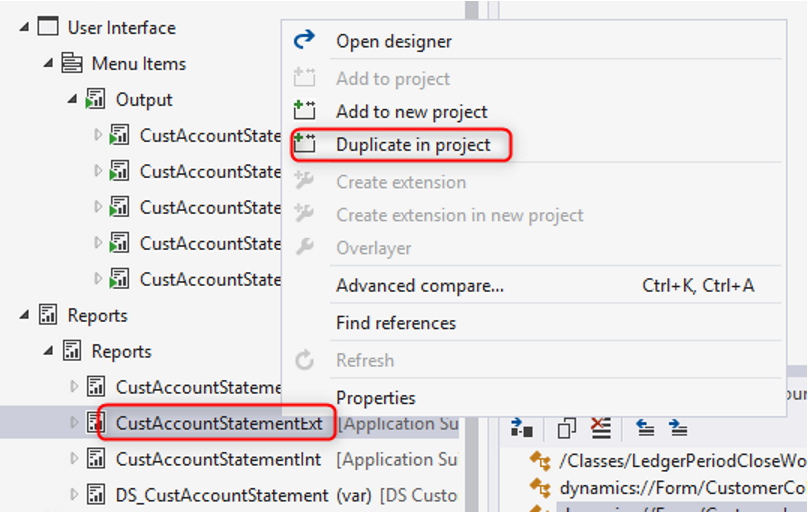
2. 复制这个报表

重命名为:CustAccountStatementExt

3.修改报告设计

右键单击报表数据集并选择恢复以刷新新字段,打开报表设计器并将该字段添加到表中

4. 创建一个新的扩展类来扩展标准报表Controller class

class CustAccountStatementExtControllerExtextends CustAccountStatementExtController
{
    //Add construct
    public static CustAccountStatementExtControllerExtconstruct()
    {
        return new CustAccountStatementExtControllerExt();
    }
 
    public static void main(Args _args)
    {
        SrsPrintMgmtFormLetterController controller = new CustAccountStatementExtControllerExt();
        controller.parmReportName(PrintMgmtDocType::construct(PrintMgmtDocumentType::CustAccountStatement).getDefaultReportFormat());
        controller.parmArgs(_args);
        CustAccountStatementExtControllerExt::startControllerOperation(controller, _args);
    }
     
    protected static void startControllerOperation(SrsPrintMgmtFormLetterController _controller, Args _args)
    {
        _controller.startOperation();
    }
}

可选方法,确定报表的默认设计,有些报表不使用

protected void outputReport()
{
    SRSCatalogItemName  reportDesign;
    reportDesign = ssrsReportStr(CustAccountStatementExt,Report);
    this.parmReportName(reportDesign);
    this.parmReportContract().parmReportName(reportDesign);
    formletterReport.parmReportRun().settingDetail().parmReportFormatName(reportDesign);
    super();
}

5. 创建新的report handler class

我们有两种不同的方法来填充报表处理程序类中的数据:

  • 添加临时表插入事件,逐行计算。转到 AOT 中的 CustAccountStatementExtTmp,展开事件节点,然后复制事件处理程序方法。
  • 添加数据处理post-handler,插入对标准解决方案的结果集使用单次传递的操作。
添加临时表插入事件
class MaxCustAccountStatementExtHandler
{
    [DataEventHandlerAttribute(tableStr(CustAccountStatementExtTmp), DataEventType::Inserting)]
    public static void CustAccountStatementExtTmpInsertEvent(Common c, DataEventArgs e)
    {
        CustAccountStatementExtTmp  tempTable = c;
        CustGroup custGroup;
        select * from tempTable
            where tempTable.CustGroup == custGroup.CustGroup;
 
        tempTable.MaxTxT = custGroup.Description;
    }
}
添加数据处理post-handler
class MaxCustAccountStatementExtHandler
{
    [PostHandlerFor(classStr(CustAccountStatementExtDP), methodstr(CustAccountStatementExtDP, processReport))]
    public static void TmpTablePostHandler(XppPrePostArgs arguments)
    {
        CustAccountStatementExtDP dpInstance = arguments.getThis() as CustAccountStatementExtDP;
        CustAccountStatementExtTmp tmpTable = dpInstance.getCustAccountStatementExtTmp();
        CustGroup custGroup;
        ttsbegin;
        while select forUpdate tmpTable
        {
            select * from tempTable
                where tempTable.CustGroup == custGroup.CustGroup;
            tempTable.MaxTxT = custGroup.Description;
            tmpTable.update();
        }
        ttscommit;
    }
}

6. 添加delegate handler

在此示例中,使用以下代码扩展 PrintMgtDocTypeHandlerExt 类中的 getDefaultReportFormatDelegate 方法。

class PrintMgtDocTypeHandlersExt
{
    [SubscribesTo(classstr(PrintMgmtDocType), delegatestr(PrintMgmtDocType, getDefaultReportFormatDelegate))]
    public static void getDefaultReportFormatDelegate(PrintMgmtDocumentType _docType, EventHandlerResult _result)
    {
        switch (_docType)
        {
            case PrintMgmtDocumentType::CustAccountStatement:
                _result.result(ssrsReportStr(CustAccountStatementExt, Report));
                break;
        }
    }
}

7. 为现有菜单项创建扩展

导航到 CustAccountStatementExt 输出菜单项并创建扩展。另请确保将 Object 属性的值设置为 CustAccountStatementExtControllerExt,以将用户导航重定向。

8. 更新Print management settings

转至应付账款 > 查询和报告 > 设置 > 表单 > 表单设置 单击打印管理,找到文档配置设置,然后选择自定义设计

关于如何根据不同的公司打印不同的报表Design,请参考:

9. 运行报告并测试结果

如何通过Print management 打印SSRS报表(how-to-print-ssrs-report-using-print-management)

报表打印管理Print management

添加一个新的Report format

如下图为Customer invoice添加两个新的Report format

图中的两个Report format可以通过添加一下代码可以实现

[ExtensionOf(classStr(PrintMgmtReportFormatPopulator))]
public final class PrintMgmtReportFormatPopulator_Demo_Extension
{
    #PrintMgmtSetup
 
    protected void addDocuments()
    {
        // Add new customized reports
        this.addOther(PrintMgmtDocumentType::SalesOrderInvoice, ssrsReportStr(DocSalesInvoice, Report), ssrsReportStr(DocSalesInvoice, Report), #NoCountryRegionId);
        this.addOther(PrintMgmtDocumentType::SalesOrderInvoice, ssrsReportStr(DocSalesInvoiceExt, Report), ssrsReportStr(DocSalesInvoiceExt, Report), #NoCountryRegionId);
        // Add the standard report design, because of PrintMgmtDocType.getDefaultReportFormatDelegate()
        this.addOther(PrintMgmtDocumentType::SalesOrderInvoice, ssrsReportStr(SalesInvoice, Report), ssrsReportStr(Sal
        next addDocuments();
    }
}

下次打开Print management setup的时候,PrintMgmtReportFormat 表中就会添加了 2 条新记录。

改变默认的 Report format

如果您需要更改Original/Copy preview的默认的 Report formatMicrosoft 建议修改PrintMgmtDocType.getDefaultReportFormatDelegate()

class THK_PrintMgmtDocTypeEventHandler
{
  [SubscribesTo(classStr(PrintMgmtDocType), delegateStr(PrintMgmtDocType, getDefaultReportFormatDelegate))]
  public static void PrintMgmtDocType_getDefaultReportFormatDelegate(PrintMgmtDocumentType _docType, EventHandlerResult _result)
  {
      switch (_docType)
      {
          case PrintMgmtDocumentType::SalesOrderInvoice:
              _result.result(ssrsReportStr(DocSalesInvoice, Report));
              break;
      }
  }
}

打印Original/Copy preview的时候,系统目前仍然会打印默认的Report format,而非用户下拉选择的Format(Bug?),因此需要通过一下代码修复:

class THK_PrintMgmtDocTypeEventHandler
{
  [SubscribesTo(classStr(PrintMgmtDocType), delegateStr(PrintMgmtDocType, getDefaultReportFormatDelegate))]
  public static void PrintMgmtDocType_getDefaultReportFormatDelegate(PrintMgmtDocumentType _docType, EventHandlerResult _result)
  {
      switch (_docType)
      {
          case PrintMgmtDocumentType::SalesOrderInvoice:
              _result.result(ssrsReportStr(DocSalesInvoice, Report));
                  PrintMgmtReportFormatName formatName = THK_PrintMgmtDocTypeEventHandler::getPrintMgmtReportFormat(_docType);
                  if (formatName)
                  {
                      _result.result(formatName);
                  }
                  else
                  {
                      _result.result(ssrsReportStr(SalesInvoice, Report));
                  } 
              break;
      }
  }
  public static PrintMgmtReportFormatName getPrintMgmtReportFormat(PrintMgmtDocumentType    _printMgmtDocumentType)
  {
      PrintMgmtDocInstance printMgmtDocInstance;
      PrintMgmtReportFormat printMgmtReportFormat;
      PrintMgmtSettings printMgmtSettings;
 
      select firstonly DocumentType, RecId from printMgmtDocInstance
      where printMgmtDocInstance.DocumentType == _printMgmtDocumentType
      join ParentId, ReportFormat from printMgmtSettings
          where printMgmtSettings.ParentId == printMgmtDocInstance.RecId
      join RecId, DocumentType, Name from printMgmtReportFormat
          where printMgmtReportFormat.RecId == printMgmtSettings.ReportFormat
          && printMgmtReportFormat.DocumentType == _printMgmtDocumentType;
 
      return printMgmtReportFormat.Name;
  }
}

添加一个新的Document type

通过以下步骤可以添加一个新的Document type

创建PrintMgmtDocumentType的Coc扩展,添加一个新的节点

创建Node class ( 例如PrintMgmtNode_Purch)中方法getDocumentTypes的Coc扩展 

[ExtensionOf(classStr(PrintMgmtNode_Purch))]
public final class PrintMgmtNode_Purch_Demo_Extension
{
    /// 
 
    /// Gets a list of valid document types for the node.
    /// 
 
    /// 
    ///    A list of valid document types for the node.
    /// 
    /// 
    /// The results can vary based on what is configured in the application because configuration keys are
    ///    used to determine this list.
    /// 
    public List getDocumentTypes()
    {
        List ret = next getDocumentTypes();
 
        ret.addEnd(PrintMgmtDocumentType::customPurchPromptLetter);
 
        return ret;
    }
 
}

之后就可以在Print management 中看到我们新加的节点了

创建新的Form letter类

这个类用来返回 hierarchy 和前面创建的document type

[PrintMgmtDocumentTypeFactoryAttribute(PrintMgmtDocumentType::customPurchPromptLetter)]
public class customPurchFormLetterReport_PromptLetter extends PurchFormLetterReport
{
    /// 
 
    /// Returns the default printer settings for the specified PrintSetupOriginalCopy enumeration value.
    /// 
 
    /// 
    /// The PrintSetupOriginalCopy enumeration value that specifies whether the Original
    /// or Copy destinations should be retrieved.
    /// 
    /// 
    /// The default printer settings for the specified PrintSetupOriginalCopy enumeration value.
    /// 
    /// 
    /// The general pattern for implementing this method is to use the printer destinations from the appropriate
    /// FormLetter class.  These printer destinations will be used if no Print Management destinations are
    /// found or used.
    /// 
    protected container getDefaultPrintJobSettings(PrintSetupOriginalCopy _printCopyOriginal)
    {
        if (_printCopyOriginal == PrintSetupOriginalCopy::Original)
        {
            return PurchFormLetter::getPrinterSettingsFormletter(DocumentStatus::None,PrintSetupOriginalCopy::Original);
        }
        else
        {
            return PurchFormLetter::getPrinterSettingsFormletter(DocumentStatus::None,PrintSetupOriginalCopy::Copy);
        }
    }
 
    /// 
 
    /// Returns the PrintMgmtDocumentType enumeration value that specifies what document this FormLetterReport class controls.
    /// 
 
    /// 
    /// The PrintMgmtDocumentType enumeration value that specifies what document this FormLetterReport class controls.
    /// 
    /// 
    /// This value is used to retrieve the appropriate Print Management settings for the report.
    /// 
    public PrintMgmtDocumentType getPrintMgmtDocumentType()
    {
        return PrintMgmtDocumentType::customPurchPromptLetter;
    }
 
    /// 
 
    /// Returns the PrintMgmtHierarchyType enumeration value that specifies what hierarchy this FormLetterReport class uses.
    /// 
 
    /// 
    /// The PrintMgmtHierarchyType enumeration value that specifies what hierarchy this FormLetterReport class uses.
    /// 
    /// 
    /// This value is used to retrieve the appropriate Print Management settings for the report.
    /// 
    protected PrintMgmtHierarchyType getPrintMgmtHierarchyType()
    {
        return PrintMgmtHierarchyType::Purch;
    }
 
    /// 
 
    /// Returns the PrintMgmtNodeType enumeration value that specifies what node this FormLetterReport class uses.
    /// 
 
    /// 
    /// The PrintMgmtNodeType enumeration value that specifies what node this FormLetterReport class uses.
    /// 
    /// 
    /// This value is used to retrieve the appropriate Print Management settings for the report.
    /// 
    protected PrintMgmtNodeType getPrintMgmtNodeType()
    {
        return PrintMgmtNodeType::PurchTable;
    }
}

最后Coc扩展populator类

这个类的作用可以参考前文“添加一个新的Report format”

/// 
 
/// Populates the PrintMgmtReportFormat table used for print management with the MyProject documents.
/// 
 
[ExtensionOf(classStr(PrintMgmtReportFormatPopulator))]
public final class PrintMgmtReportFormatPopulatorAppSuite_custom_Extension
{
    #ISOCountryRegionCodes
    #PrintMgmtSetup
 
    protected void addDocuments()
    {
        // Purchasing documents
        this.customAddPurchaseDocuments();
 
        next addDocuments();
    }
 
    /// 
 
    /// Adds purchase records to the PrintMgmtReportFormat table.
    /// 
 
    protected void customAddPurchaseDocuments()
    {
        this.addOther(PrintMgmtDocumentType::customPurchPromptLetter, ssrsReportStr(customPurchPromptLetterReport, Report), ssrsReportStr(customPurchPromptLetterReport, Report), #NoCountryRegionId);
    }
 
}

完成!

如何在D365FO创建SSRS报表(二)Controller Class(how-to-create-ssrs-report-in-d365fo-part2-controller-class)

Report controller

继承SrsReportRunController

如果没有特殊要求,以下代码就可以搞定。

public class Demo_InventJournalTransTransferController extends SrsReportRunController
{
 
    public static void main(Args _args)
    {
        Demo_InventJournalTransTransferController controller 
          = new Demo_InventJournalTransTransferController();
 
        controller.parmReportName(ssrsReportStr(Demo_InventJournalTransTransfer, Report));
        controller.parmDialogCaption("@Demo954");
        controller.parmArgs(_args);
        controller.startOperation();
    }
}

多选

如果需要打印用户所选的数据,多选需要用到 MultiSelectionHelper

public class Demo_InventJournalTransTransferController extends SrsReportRunController
{
    ......
 
    public void preRunModifyContract()
    {
        Demo_InventJournalTransTransferContract contract 
          = this.parmReportContract().parmRdpContract() as Demo_InventJournalTransTransferContract;        
    }
 
    public void prePromptModifyContract()
    {
        Demo_InventJournalTransTransferContract     contract;
 
        contract = this.parmReportContract().parmRdpContract() as Demo_InventJournalTransTransferContract;
 
        this.setRanges(
           this.parmReportContract().parmQueryContracts().lookup(this.getFirstQueryContractKey())
           , contract);
    }
 
    public void setRanges(
        Query _query,
        Demo_InventJournalTransTransferContract _contract)
    {
        MultiSelectionHelper    multiSelectionHelper;
 
        if (this.parmArgs().dataset() == tableNum(InventJournalTable) && this.parmArgs().caller())
        {
            _query.dataSourceTable(tableNum(InventJournalTable)).clearRanges();
            multiSelectionHelper = MultiSelectionHelper::createFromCaller(this.parmArgs().caller());
            multiSelectionHelper.createQueryRanges(_query.dataSourceTable(tableNum(InventJournalTable))
               , fieldStr(InventJournalTable, JournalId));
        }
 
    }
 
}

如果需要根据Print management的设定来打印,请参考文章:

如何在SSRS报表中创建条码、 二维码(how-to-create-barcode-qrcode-in-ssrs-report)

Barcode和QR code在SSRS报表中很常见,下面分别介绍如何添加他们。

二维码QRcode

在SSRS的临时表中创建一个字段存储二维码,类型扩展 Bitmap

在相关类中添加如下代码,举例说明: xyzTableBuffer.QRCode =QRHelper::QRCode(“123456789”)
public static container QRCode(Str _QRContents)
{
// QRContents is a formatted string provided as input to this function.
// For example _QRContents= ?name='Customer name'&rr='RFCno'&tt='totalInvoiceAmount';
 
    System.Drawing.Bitmap bm = null;
    try
    {
        var qrCodeEncoder = new Encoder();
        bm = qrCodeEncoder.Encode(_QRContents);
    }
    catch (Exception::CLRError)
    {
        error(CLRInterop::getLastException().ToString());
    }
    using (var stream = new System.IO.MemoryStream())
    {
        bm.Save(stream, System.Drawing.Imaging.ImageFormat::Bmp);
        bm.Dispose();
        return Binary::constructFromMemoryStream(stream).getContainer();
    }
}

在报表设计中添加图片,参数如下:

条码Barcode

在SSRS的临时表中创建一个字段存储二维码,类型扩展  BarCodeString
举例说明: xyzTableBuffer.BarCodeField= this.getBarcode(“123456789”)
在报表设计中使用字体 >BC C128 Narrow

public str getBarcode(str _barCodeText)
{
    BarcodeCode128 barcode;
    barcode = Barcode::construct(BarcodeType::Code128);
    barcode.string(true, _barCodeText);
    barcode.encode();
 
    return barcode.barcodeStr();
}